Showing posts with label YOUTUBE. Show all posts

Wednesday, 11 May 2011

HOW TO USE MORE THAN ONE GOOGLE TALK IN ONE COMPUTER

It is very important to use more than one google talk on your computer if you have more than one account in gtalk.If you have two GMail accounts one for business and one is personal.Both are important for us.Then what we do to run more than one google talk on my PC?here is the answer for you.Just apply the below steps carefully ,It will lead you to the use of multiple instances of google talk.

Step 1: Create a shortcut of the google talk on some where in your PC(Consider in desk top)
           To create a short cut go to C:\Program Files\Google\Google Talk and right click on the google talk and select send to desk top

google talk
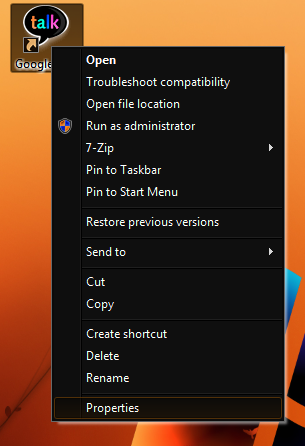
Step 2:Now comeback to the desk top and find the google talk short cut.Right click on this shortcut and in the menu appeared select properties

number of gtalk on PC


Step 3 :Now you will get a new window,in that window look the target text box and add /nomutex to the end of that line.
multiple gtalk on same PC
Now the target line becomes as below
"C:\Program Files\Google\Google Talk\googletalk.exe" /nomutex

Step 4:At last click on the OK button.Now you can open the original gtalk and the shortcut gtalk at the same time to sign in with different accounts.

You can create number of gtalks similar way.

Tuesday, 10 May 2011

HOW TO CREATE A IM BOT,HACKING GOOGLE TALK,YAHOO,MSN ETC.

In this post I am going to share you about a IM bot.This bot can be used as a autoresponder for your chat clients such as google talk,yahoo,msn etc.

Here I am going to share how to make your own IM bot.I just created a bot called TrickZone,That will respond your messages automatically.You can check it now by adding trickzone@bot.im to your google talk buddy list and try to chat with it.

You can follow the below steps to create your own IM bot

Step 1: Go to www.imified.com and register for an account.

Step 2: Now you have to write a script for the bot.You can write in any language.

If you are unable to write one look to my example which is coded in php


Step 3:Once the script is ready goto any hosting provider,If you have one just put on it or just sign up for a free hosting.

Step 4:Now upload the code into the host and copy the exact url of it.

Step 5:Now come back to imified and login with your email id and password.

Step 6:Click on create new bot and Fill the screen name and bot script url.just click on create.

Now your bot is ready.Just pass your id to all your friends and have fun...

WATCH LIVE IPL MATCH ONLINE,STREAM LIVE IPL ON YOUR BLOG OR WEBSITE

Do you want to watch live IPL online?I am here with you to show live Ipl match on your PC with the use of Internet connection.Here you can watch live match on my blog or you can put a simple code on your blog or website or you can watch it in your computer,if you don't have  a blog or website.

1.Watch live IPL on my blog

You can watch live IPL on my blog by following the link http://newtricksandtips.blogspot.com/p/live-cricket.html

2.Stream live live IPL on your website or blog

You can also stream live IPL on your blog or website .To do so you can create a new post or page in blog and copy paste the code below and publish that post or page..

If you are having a website you can copy and paste the below code into your website body part


3.Watch live IPL on your Computer

You can also watch live IPL in your PC without the help of any website or blog.To do so copy the below code into notepad and save it as ipl.html.Now double click on ipl.html or open with any browser.You are done!


Enjoy this ipl

IS YOUR GMAIL HACKED? HOW TO RECOVER IT?

It can be big loss for you if your gmail account hacked by someone and you lost the control on it.Since all the other accounts such as blogger,adsense,adwords,orkut,etc. are related to this single email id.
If you lost your account,you can use the following recovery methods..

1.Try the password reset
     
        The easiest way to get back your account is the resetting of your password.You can reset the password by answering the secret queston or by sending a reset link to the secondary mail.You can start the reset process by following the link https://www.google.com/accounts/ForgotPasswd

2.By filling the recovery form

       In most of the cases the password reset may not be succfull,Sice the hacker will change the security question and the secondary email address up on hacking your account.At this stage you can use the second method of password recovery as filling the recovery form.The account recovery form will ask you several questions and you have to fill answer for that questions.Some of the questions are,

1. Email addresses of up to five frequently emailed contacts
2. Names of any 4 Labels that you may have created in your account
3. List of other services associated with your lost account
4. Your last successful login date.
5. Account created date(It can be get here)
6. Last password that you remember etc.

 Recovery form can be accessed here
Try to fill the form with more accurate data,remember it is the last chance to recover your account back.

Monday, 9 May 2011

HACK WEBCAMS TO WATCH LIVE VIDEOS WORLD WIDE

Here I will show you how to do a simple search for unprotected webcams on the net.

You can watch the videos from different cams fixed in the different places in the world.

To watch live cams go to www.google.com(opens in new window)

Put the following line of code into the search box

inurl:/view/index.shtml
or
intitle:liveapplet inurl:LvAppl

After the line of code is put in the search box hit enter or click google search


As usual google will show a list of search results.You can enter into any of that site,There will you can get live cams.

You have some controls over this videos.Just try it.

Monday, 2 May 2011

CHANGE YOUR FACEBOOK PROFILE THEME

Are you bored by the facebook theme?Did you ever think about changing the facebook theme?Is it possible to change facebook them?how can I change facebook theme?

Here I am going to introduce you a new site that giving you the trick to change facebook theme.By the use of this site you can change your facebook theme and get a new theme instead of old boring theme.This site is totally free to use.The site is http://itha.tk/facebook .You can just follow this link to change your theme.certain procedures are there to change the theme,so do each and every step very carefully and get a new design for your facebook profile like orkut profile.

So its time to change your facebook.com profile the just check it http://itha.tk/facebook


Submitted by

Rahiman

Sunday, 1 May 2011

ITHA.TK SHORTEN YOUR URLS,LINKS...

I just find out a new shortening service,http://itha.tk.It provides you a very shortening of your bigger links.When we compare itha.tk with other shortening services such as www.tinyurl.com,it is of minimum of 11 characters long.But in the case of itha.tk,it is only 6 character long so it provides a higher level of shortening for your long links.And also when I gone through both these services I found that the tiny url gives a long url even after shortening,since the number of characters after the slash is too large and it also increases your link length.But when i gone through www.itha.tk it is more convenience than other url shortening methods..

I personally short my blog url by using itha check it out http://itha.tk/tips


Check www.itha.tk

Wednesday, 13 April 2011

HOW TO WATCH HIGH QUALITY VIDEOS IN YOUTUBE

Hello guys,
we all daily watches video & download from the youtube.you know every video of youtube is in flash format.some video is in very cheap resolutions.so if you watching a video online in youtube & u feeling that it is not much more clear,so just do this trick.you have to add this code behind the youtube video you are watching.after adding this code you will find out that video qualiy has been boost.this trick you can do with downloading. for example:http://www.youtube.com/watch?v=vPnww_h0I60,this is url of video you are watching.now what you have to do,just simple.http://www.youtube.com/watch?v=vPnww_h0I60&fmt=18,& hit the enter.now see this video in high defination & clarity. in downloading section. this is the video url u want to download in mp4 format without using anysoftware.just try this trick.your video automatically will download in mp4 quality. example:http://www.youtube.com/watch?v=vPnww_h0I60,just add the same code behind the url.http://www.youtube.com/watch?v=vPnww_h0I60&fmt=18,now download it.it will download in mpeg-4 technology. 
this trick has been made by-johnplayers-http://www.learntohack.webnode.com

Tuesday, 29 March 2011

WATCH LIVE CRICKET MATCH AND STREAM ON YOUR WEBSITE,BLOG AND DESKTOP

Are you away from home?or are you in office?taking leave on match days?

Here is the solution for all your questions and you can watch cricket online with your internet connection.I am here  with a collection of channels showing live cricket match online.You can watch live cricket with the help of this site http://www.netcricket.tk/ over more than 4 channel from different servers.This site provides a high quality streeming of live cricket world cup.I mean you can able to watch live match even with the help of dial up connection.You can connect your mobile to PC and use this for watching live match.It will give high performance over highspeed inter net.

One benefit of this site is it provides you to streem live on your site.It providing a iframe for putting live match on your blog or website.With the help of this iframe the users who are all not having a blog or website can watch match on system desktop.

I personnally put that in my blog and you can watch live match my blog itself. check it at http://newtricksandtips.blogspot.com/p/live-cricket.html

I am here embedding that code for you..If you are a owner of a blog copy the code and paste in your site where ever  you want
If you are a normal user copy the code and paste it on notepad the save it as cricket.html.After saving double click on it and open with any browser now you will be able to watch live game.


watch more on http://www.netcricket.tk/
Share it with your friends....Comment here on my blog...Ask your doubts here..If any one able to clear the doubts clear here itself.

This site is not working now...

Sunday, 20 March 2011

SEND AND RECIEVE EMAIL ON MOBILE WITHOUT GPRS CONNECTION

Now it is possible to receive emails on your mobile without using GPRS. This has been made possible by a new application called BlacMail. BlacMail, launched by BSNL, is a mobile app that allows you to receive and send emails on your mobile phone instantly, without GPRS.

BlacMail allows you to connect with other popular web mail service providers like Yahoo! Mail, Gmail and Hotmail as well as popular social networking sites like Facebook, Orkut and Twitter. Additionally, it allows you to share job alerts from popular employment portals like Naukri, TimesJobs and Monster. Presently, this pushmail service is available only in certain places in southern India. However, BSNL plans to launch the service nationwide soon.

Features of BlacMail

* White list –This feature helps you to receive emails from selected group of contacts only and thus avoid spam easily.
* Separate Mail Box – BlacMail is a separate app and hence it has a separate inbox for your mails. It does not clutter your inbox with SMS(s).
* BlacMail PIN – The PIN is to ensure the safety of your BlacMail emails. After activating the PIN, you will have to enter that PIN every time you want to access BlacMail app on your mobile.
* On Demand Check Mail – This feature allows you to get your emails only when you want it.

BlacMail should work on any cell phone with Java, MIDP 2.0 + and CLDC 1.1 +.

Detail information and download available here

SIMPLE THREE WAYS TO GET LISTED IN GOOGLE

There are three simple methods to getting listed in Google, but only one of these is guaranteed... well almost. ;o)
1. Submit Direct To Google
The first method is to submit your web site via Google's free submit your site form. Just submit your home page and Google's crawler, Googlebot, will crawl the rest.
However, Google does not add all submitted URLs to their index, and there is no guarantee as to when, or if, your site will be indexed.
2. Get Linked From A Site That Google Crawls
The second method is to get a site that Google already crawls to link to your site. So when Google recrawls the web site, it will find the link to your site and crawl and index it as well.
This is Google's preferred method of finding sites to index.
To get another site to link to yours, simply look for a site that links to your competitors and ask them to link to yours. You may have to offer a link back to their site in exchange.

You can get a link back from my site by commenting on below my posts.I wont moderate your comments..I know the difficult to get crawl in Google ..But remember one thing that when you comment just comment related to my post,otherwise the google will mark it as spam.

The linnk back from any site will help you to crawl your site faster than submitting it to directory..

3. Submit Your Site To The Yahoo! Directory and The Open Directory Project Index
The third method is to submit your web site to the Open Directory Project index.
As far as I know, this is the only guaranteed method of getting into the Google index.
For more information, visit the How to add a site to the Open Directory page.
Once your site is included in either of these directories, it should appear in Google in about 4 to 8 weeks.

Friday, 18 March 2011

BYPASS PAYPAL PAYMENT TO GET FREE STUFFS,PAYPAL HACKING

I found a script to get a book, script, soft, ... on a website using a Paypal button to sold it.

Just add the following in bookmark, or copy/paste it.

javascript:top.location=document.getElementsByName('return')[0].value; javascript:void(0);


When you are visiting a page using a paypal button, just click the bookmark or paste the code in the URL bar of your navigator.

If it works, you will be redirected to the download page
Else, try another site (or buy it )

It works with :
Chrome [y]
Firefox [y]
IE [?] (anyone can test it?)
Opera [y]
Safari [y]

A link the script works on : http://www.ptcexpert.com/

Try script on above website::If you find another link, please share
find website using google:::
search below code with quote
"this order button requires a javascript enabled browser"
then follow by Page:1

Here Screen Shots
Step:1


Step:2


Step:3


Note: This is illegal and is for educational purpose only. Any loss/damage or mis happening, will not be in any way our responsibility.

Sunday, 27 February 2011

HOW TO FIND EMAIL ID OF ANY USER IN ORKUT,HACKING TRICK

To know email id of any person follow the below steps

* Navigate to the profile page of the member you wish to know the email address.
* Add that person as a friend.
* Now navigate to your friends page.


* On the right hand side, you will find a option to export contacts.

* Choose Export Contacts Option.

* Fill in the Word Verification on the Next Page.

* You will be prompted to download the contacts.csv file.

* Once you have downloaded the file, open it in Microsoft Excel or any other compatible software.

NowYou will see all the email addresses including those which have not yet accepted your friend requests but have recieved your friend request.

Monday, 21 February 2011

2-STEP VERIFICATION FOR GOOGLE ACCOUNTS TO AVOID HACKING

2-step verification adds an extra layer of security to users OF Google Apps accounts by requiring them to enter a verification code in addition to their username and password, when signing in to their account.

The Google Apps Service Level Agreement does not apply to any services used in connection with 2-step verification if the verification process relies on third-party voice or data providers to deliver the verification code.

Why should You enable 2-step verification for my account?

2-step verification helps protect a user's account from unauthorized access should someone manage to obtain their password. Even if a password is cracked, guessed, or otherwise stolen, an attacker can't sign in without access to the user's verification codes, which only the user can obtain via their own mobile phone.

Requirements

A mobile phone that can receive the verification code via text message or phone call.
Or
An Android, BlackBerry, or iPhone. These devices use the Google Authenticator mobile app to generate the verification code.
Note: 2-step verification can't be used for accounts using a SAML single sign-on service (SSO).
2-step verification is only available in US English in the next-generation version of the Google Apps administrator control panel.

How it works

You enable 2-step verification for your domain in your Google Apps control panel. See Setup 2-step verification for your domain for how to enable 2-step verification for your account. We recommend that you notify your users of this new security process and include instructions on how to get started.
Note: You can't force your users to use 2-step verification, they must opt-in themselves.

The user enrolls in 2-step verification, and selects the method for receiving their verification code on their mobile phone: the Google Authenticator app, text message, or phone call. How quickly they get their code via text message or phone call depends on their service provider and location. We recommend users with smartphones to use the Google Authenticator app which can generate codes without a network connection.


To set up 2-code verification,you need to follow these steps:


Sign in to your Google Apps Gmail Account and click Settings (in the top right corner).
Under the Accounts tab, click Google Account settings.
Under Personal Settings, click Using 2-step verification
Follow the steps in the 2-step verification guide to set up 2-step verification.


The next time the user signs in to their Google Apps account on a new browser or device, they enter their username and password as usual. They're then prompted with a second page to enter a verification code. When your user checks Remember verification for this computer, they're only prompted to enter a verification code once every 30 days per browser or after deleting their browser's cookies. Your users should not check this if they're at a public or shared computer.


Depending on how they opted to receive their code, the user gets their time-based, one-time code from the Google Authenticator app on their smartphone or via text message or phone call. They then enter the code to successfully sign in.

If a user loses their phone, they can use backup codes to sign in.


Signing in to mobile devices with application-specific passwords
Once your users enroll in 2-step verification, they may need to use application-specific passwords in addition to their verification codes. For installed applications that don't have a 2-step verification field, your users will need to enter an application-specific password once per device or application in place of their regular password to access their Google Account.

Common devices and applications that require application-specific passwords are: Gmail and Google Calendar on Android-based phones, ActiveSync for Windows Mobile and iPhone, and IMAP clients such as Thunderbird. See Sign in to mobile or desktop apps for more details.

Remember that good security practices are critical to the integrity of your user's Google Account.

Monday, 2 August 2010

DOWNLOAD YOUTUBE VIDEO ON MOBILE

Follow the below procedure
 
In ucweb, Go to www.youtube.com
search the video you want to download and click on it.
    On the next page, ucweb wont be able to play video because of the absence of flash player
    . No problem! Just go to menu->tools->copy and select 'Page URL'. Now go to menu->tools-> clipboard and press centre button on first link in the list.and then copy it by pressing star key on already selected text of link and then copy.
    Now open new window (menu->window->new window) and go to www.keepvid.com

    paste it in the URL box on the site(by pressing star key after selecting URL box). Now hit download button next to it. You will get two download links for low and high quality video files. Just click on any link as per your preference and download begins. You can play this flv or mp4 video on your cell with coreplayer 1.3 or higher.  
Note: if keepvid.com is unable to give you links to download, just refresh the page(star key by default). Keep refreshing the page till you get download links. Most probably It will not take more than one or two attempts.

Sunday, 25 July 2010

DOWNLOAD YOUTUBE VIDEOS IN MOBILES

1)Goto www.youtube.com

2.copy the Url of your Desired video.

3. Paste this url in your Browsers Address bar and Do the following:--

-->If you want to download videos in Flv format:

Add OK before the Youtube.com.

Example1:http://www.OKyoutube.com/watch?v=CdPuOGazWZg

--> If you want to download videos in 3GP format:

Add 3.OK before the Youtube.com.

Example2:

http://www.3.OKyoutube.com/watch?v=CdPuOGazWZg

--> If you want to download videos in Mp4 format:

Add 4.OK before the Youtube.com.

Example3:http://www.4.OKyoutube.com/watch?v=CdPuOGazWZg

4.After choosing your desired format,

Now Press Enter and Download will start...

5. Save it and Enjoy!!!!!